First devlog of the year, also 100th week. I focused on the dog NPC : made a few animations, the animation blueprint and state machines, and its AI (behavior, *not* LLM or GenAI). Below are the highlights.
Animations
I made a bunch of animations in Blender. They include the movement, like walking, running, trotting, and also a bunch of idles, some specific actions like sniffing, digging, and even made a backflip animation as a joke (because why not?).
There are also additive animations that are meant to be blended with others, like turning left/right, confused head tilt, barking, tail wagging…etc.
Below is an example of an additive animation : head tilt, for confusion. Only the affected parts (the neck, head and ears) are animated.
Here’s another showcase of the animations inside Unreal Engine.
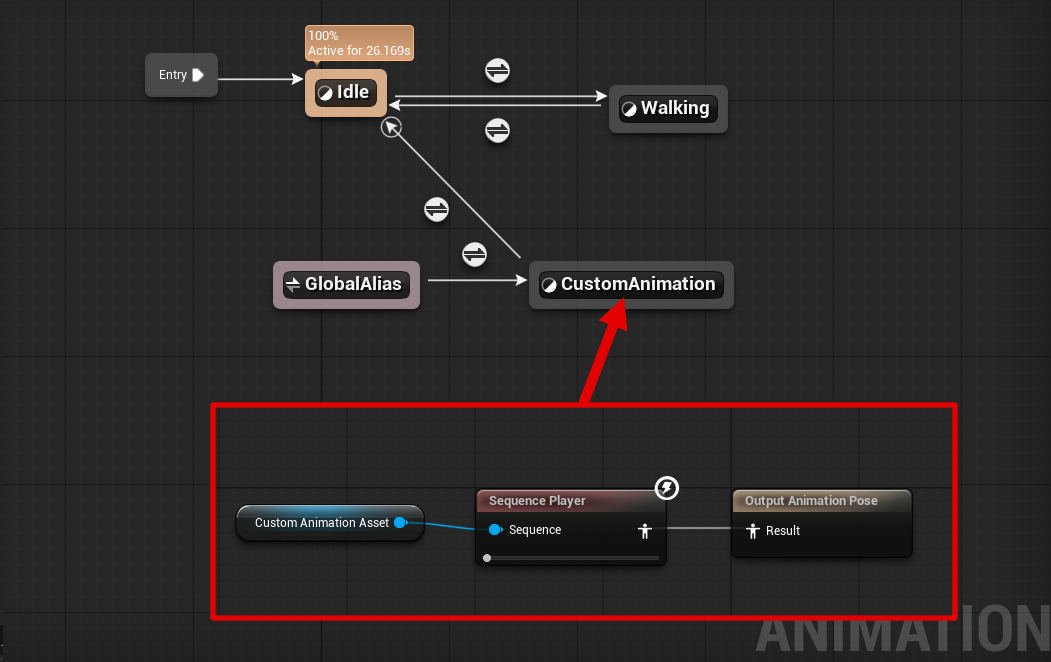
After that I made an animation blueprint that supports playback of custom animations through a variable with a reference to the animation asset passed to the ABP, and that in turn is played in a custom state in the state machine called “custom animation”.
One funny thing that happened : the IK rig was messed up and the left thigh was moving weird. I didn’t notice it until I finished the walk and run animations. So I did what every reasonable person would do in such case : I made up a lore reason behind it. The dog canonically has messed up left thigh. It’s not a bug, it’s a feature.
Barks
If you are attentive, you might have noticed that dogs tend to bark. So I had to program that behavior. I made a “is barking” variable that tells the animation blueprint to play the “bark” animation. There are different ways to set it, either from animations (the event “AnimNotify_AydiBark”), or randomly/externally by calling the “TriggerBark” event. The bark animation in turn has an animation notify to trigger the barking sound, which is shown in the event “AnimNotify_AydiSoundBark”.
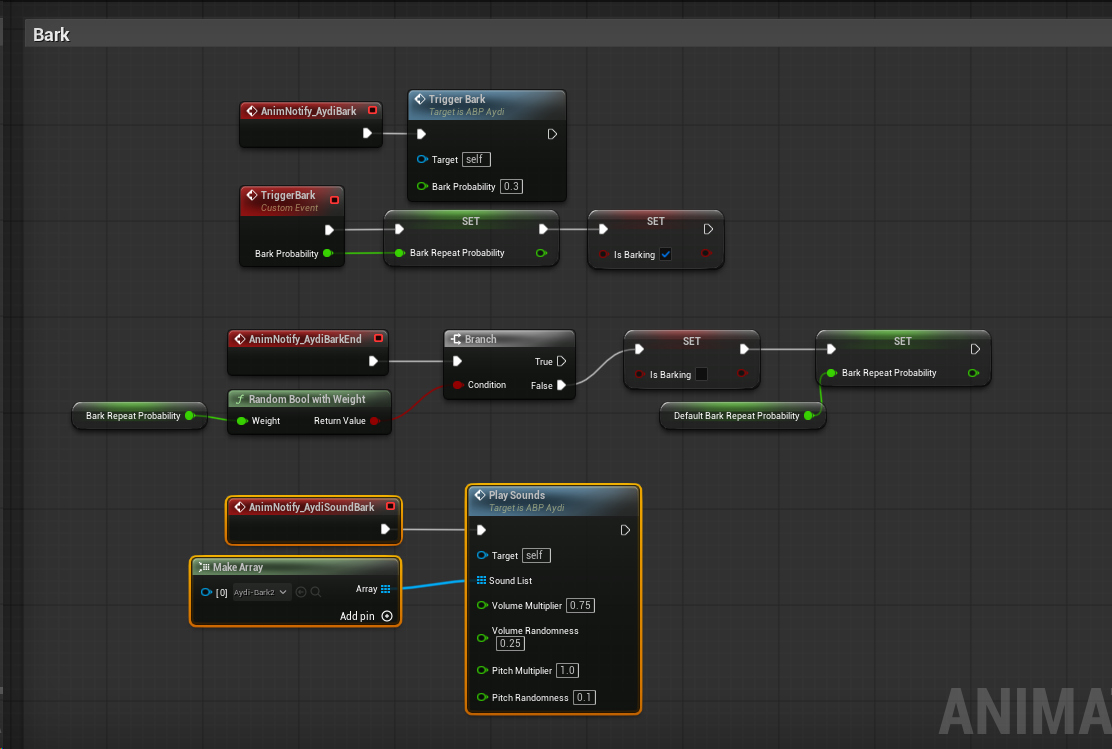
There is an extra variable called “Bark Repeat Probability”, which sets how likely it is for the barking to continue. A value of 0.0 means the barking will never repeat, but a value of 0.9 means there’s a 90% chance it will continue. The “AnimNotify_AydiBarkEnd” is called each time the bark animation ends, and if the random condition is met, it takes care of setting the “Is Barking” variable to false and the bark repeat probability to its default value.
Below is an example demonstrating it. Notice how it can be triggered in 3 different ways : randomly (every few seconds), through an animation that has the “AninNotify_AydiBark” anim notifty in the timeline, or externally through a custom script (by a trigger box in this case). Notice how the barking continues with the higher probabilities.
Eye Expressions
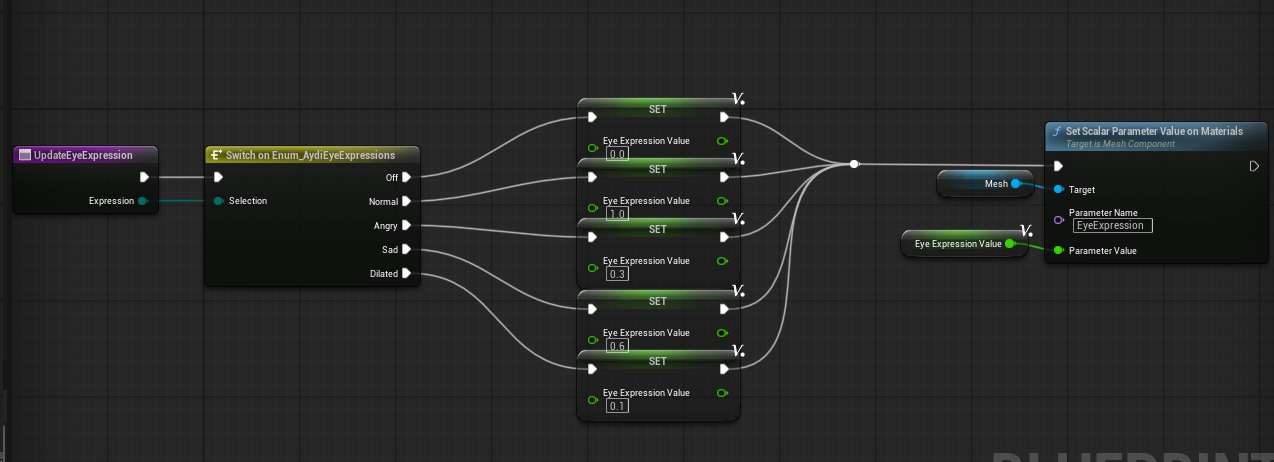
I implemented the eye expressions like I detailed in the previous devlog. I realized I could just write HLSL(-ish?) code using the “Custom” node, and it makes things much easier. I will totally not abuse this.
The animations can be played from animations, using Anim Notifies, similar to the barking. It’s only setting the value of “EyeExpression” in the material to the value corresponding to the requested expression. Eg. Off is 0.0, and Angry is 0.3.
Here’s an example where the dog’s eyes dilate because he saw something exciting on the ground (a crawling bug?)
Points of Interest
Another characteristic of dogs is being constantly distracted by things as they walk. I didn’t want them to be constantly following you without looking around and getting distracted, so I made a PoI system. A PoI is just an actor I place in the scene, with a radius and a defined set of parameters, such as what kind of animation to play, where to go, who to follow, bark…etc. Basically I gave the dog ADHD.
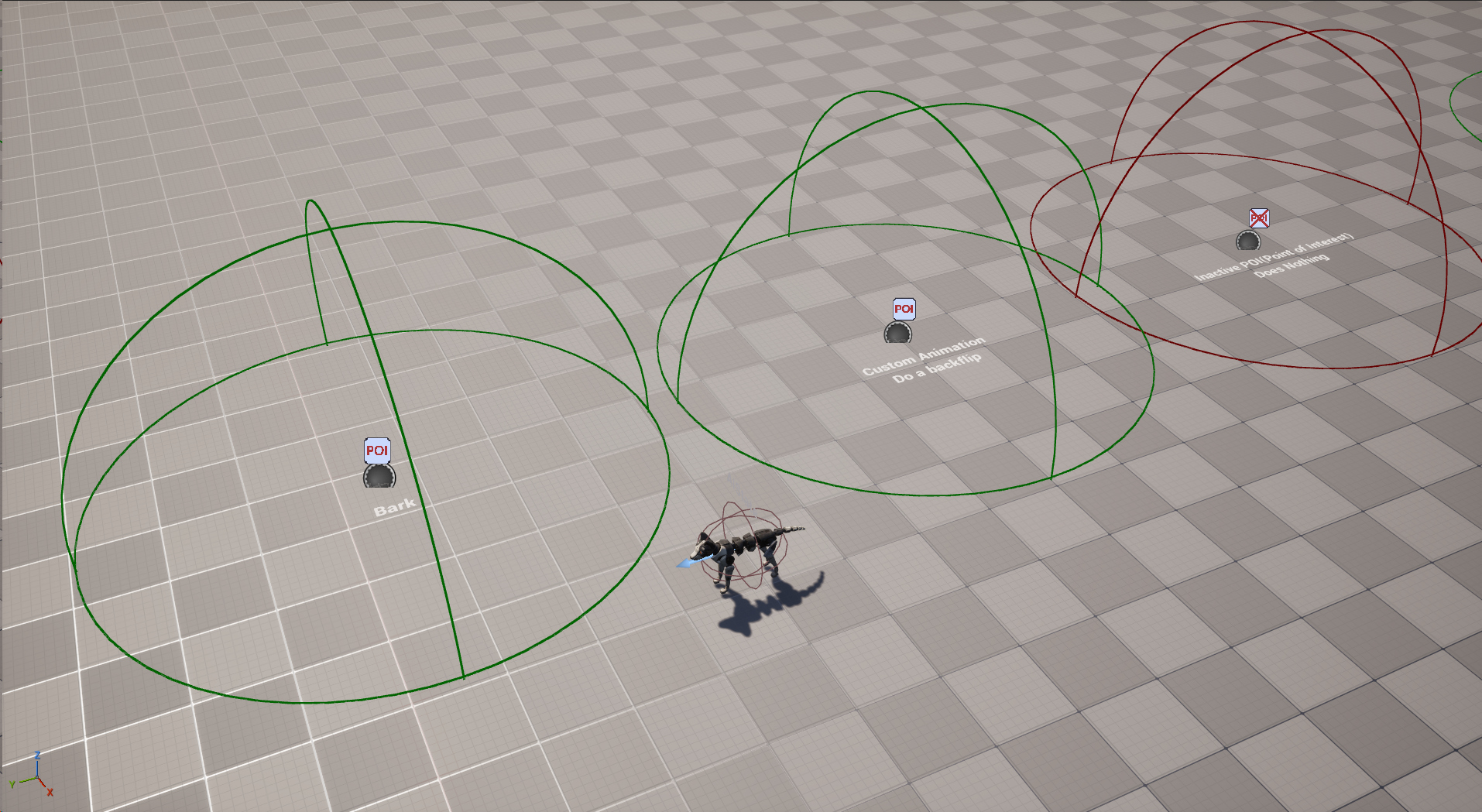
The PoI communicates the parameters with the dog character (“Aydi Actor”) similar to the diagram below. It also communicates with the player and interaction actor to trigger custom interactions if needed.
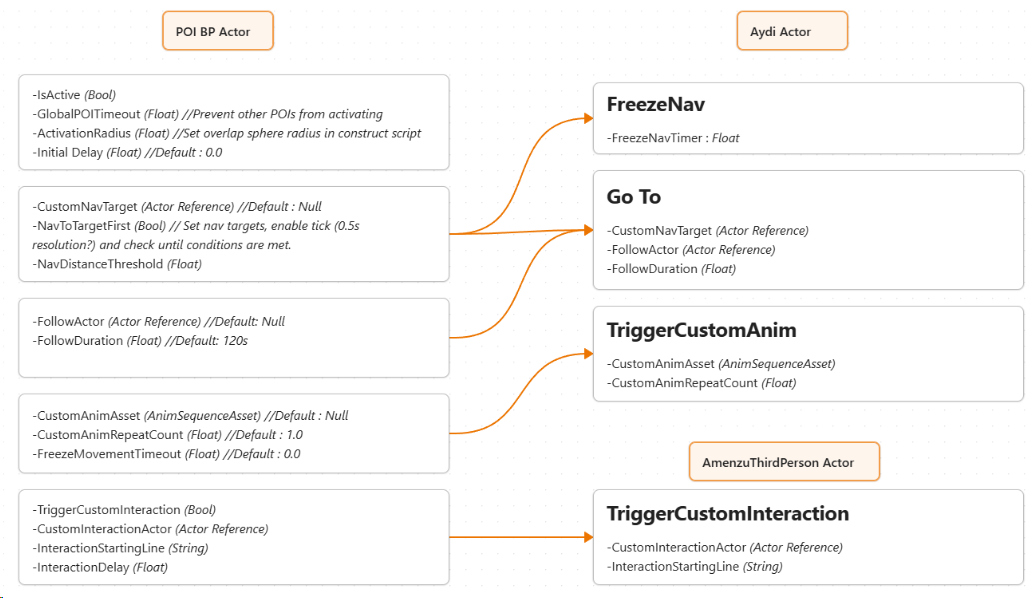
The diagram was just a draft. I implemented 100% of the logic from the side of the dog NPC, and only left the POIs as data containers.
It’s still a WIP, but the PoI parameters are as follows.
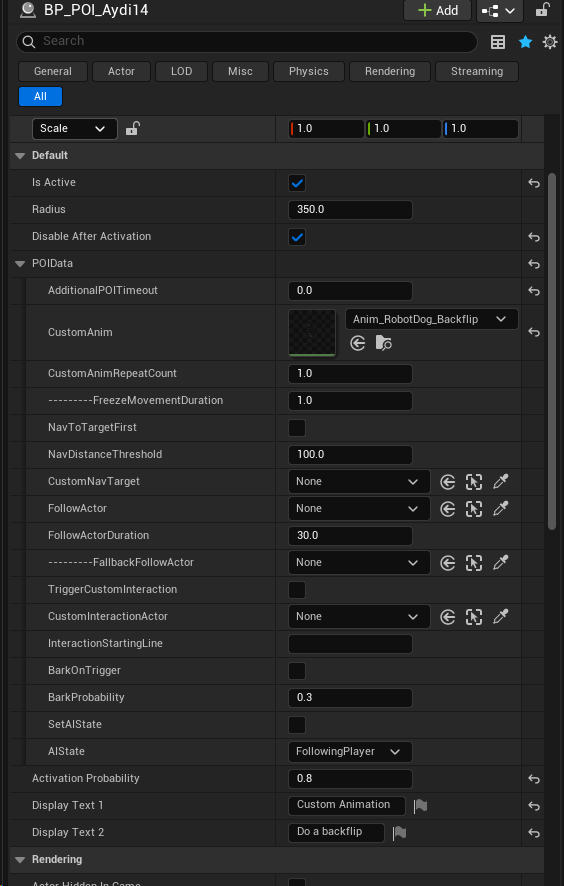
Not all fields need to be eet. For example if you don’t provide an animation, the dog will not play a custom animation.
An important field is the activation probability. The logic behind it is that the dog will not investigate or get distracted every time you walk by a PoI, otherwise it becomes repetitive and annoying. There’s also a “disable after activation” to prevent the PoI from firing again, and a “Additional PoI Timeout” that stops the dog from focusing on PoIs for that specified duration.
Interaction
I added the interaction component, and made it possible for PoIs to trigger interactions for any actor and from any line in the script. The first PoI triggers the “(Aydi found something interesting on the ground)” line, which is not accessible any other way. The second triggers an interaction with another actor.
Follow Friends
In addition to “Follow Player”, there is another AI state called “Follow Friends” in which the dog can follow anyone from a list of friends within a specified distance (5m/16ft by default), which also includes the player.
The person he follows depends on how much he likes the current person and the other person. Eg if the dog is following you, and you have a friendship score of 50, and you walk by another person with a frienship score of 25, the chances of him following the other person are low.
The exact formula is shown below. The probability is clamped between 12.5% and 87.5%. So even if you have the maximum friendship score, and the other person has the lowest frienship score possible, there’s still a 12.5% chance the dog will follow them instead.
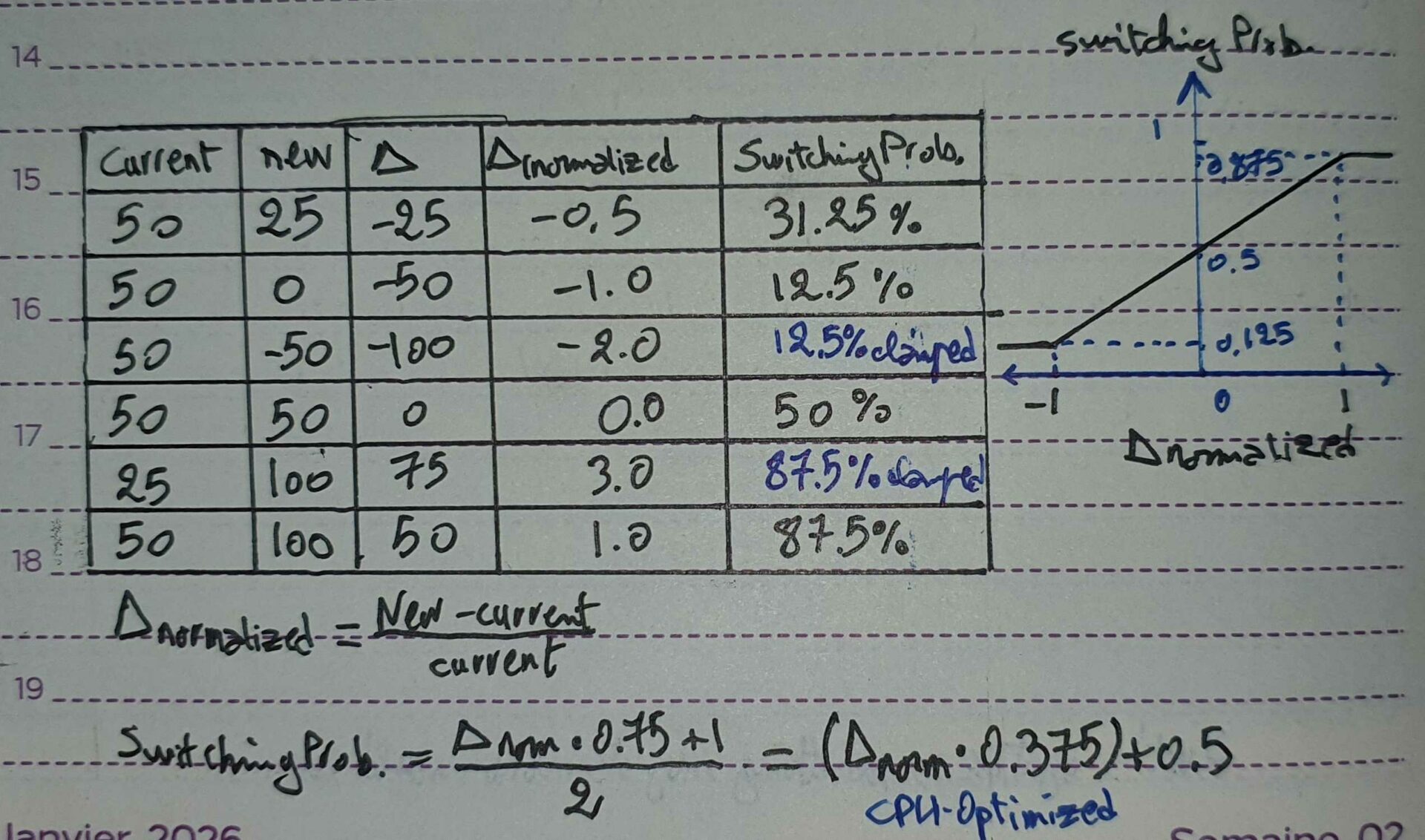
The probability is time-based, it happens every 1 second (subject to change to 0.5 or 2 seconds if I find those values work better). This means that this not only affects the switching probability, but how long the dog will remain following them before switching to someone else in the area, effectively spending more time with the people he likes the most.
I still gave the player advantage : a higher score, and also a much higher detection range (currently 4x higher, but it’s subject to change). It’s possible for the dog to wander indefinitely in an area if the player is not around.
Wandering
The last behavior I programmed was the ability to just wander around when following the player (or another NPC). If you stop walking for a few seconds, the dog will walk into a random location. The dog will go back to following you as soon as you start moving again.
AnimCache Demo 2
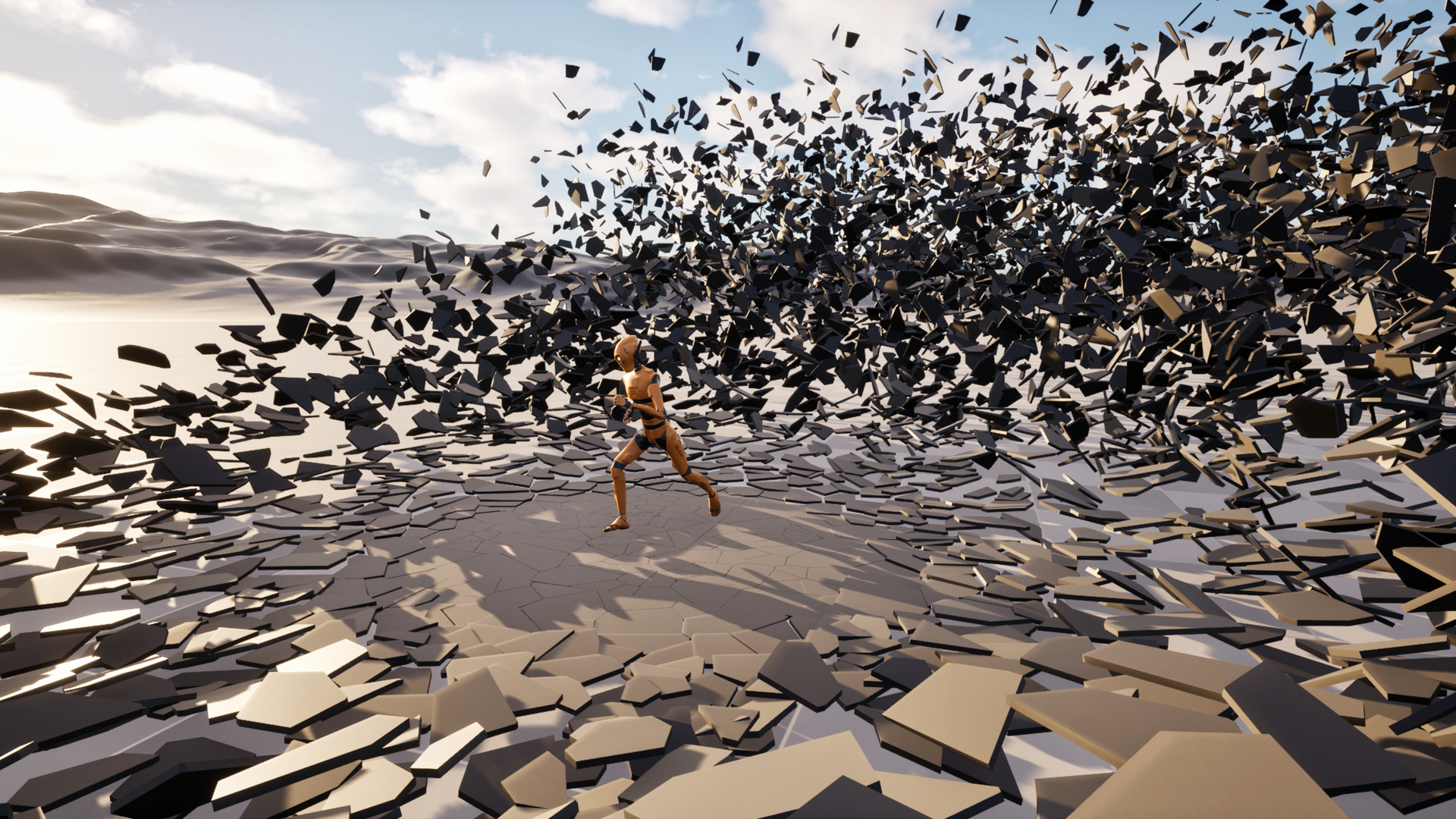
I made another test scenario for the object animation cache workflow I talked about in the previous devlog. This time with shattering glass. It’s a stress test scenario with 13,500 individual pieces and about 770K triangles. It ran fine on the steamdeck, getting around 40FPS in this scene (the volumetric clouds were expensive to compute and slowed it down so it’s not a very fair test). I actually underestimated the SteamDeck, I’m impressed.
Misc
I decided to learn Rust and some Vulkan as a 2026 resolution. Probably because I hate myself. I don’t know how to feel about rust, coming from C++ and python. I understand the reasoning behind it, and it’s actually impressive and smart, but it’s not clicking yet. I’ll give it a few months and then decide if I like it or not, because it’s too early to tell.
I played Oneshot, I liked the 4th wall breaking mechanics and story. Also I notied that Kunos released an early access version ACRally, and it’s everything I wanted to see in a sim rally game. I can’t wait for more content updates.
Next weeks I’d like to focus on the UI (settings, main menu…etc). I’m not sure where to start yet, but I’ll figure it out.
Thanks for reading, I hope to see you again next time!